MiCasa

Your browser's home page, and nobody else's business.

One HTML file. It opens with the time, the weather, the air you are breathing, your own news feeds, what is shaking near you and what is going to orbit next. Every byte of it is fetched by your browser, from public APIs, with no middleman. There is no account to make, no server behind it, and nothing anywhere that knows you were here.

Any browser GPLv3 Single file Zero tracking
Open MiCasa Source on GitHub
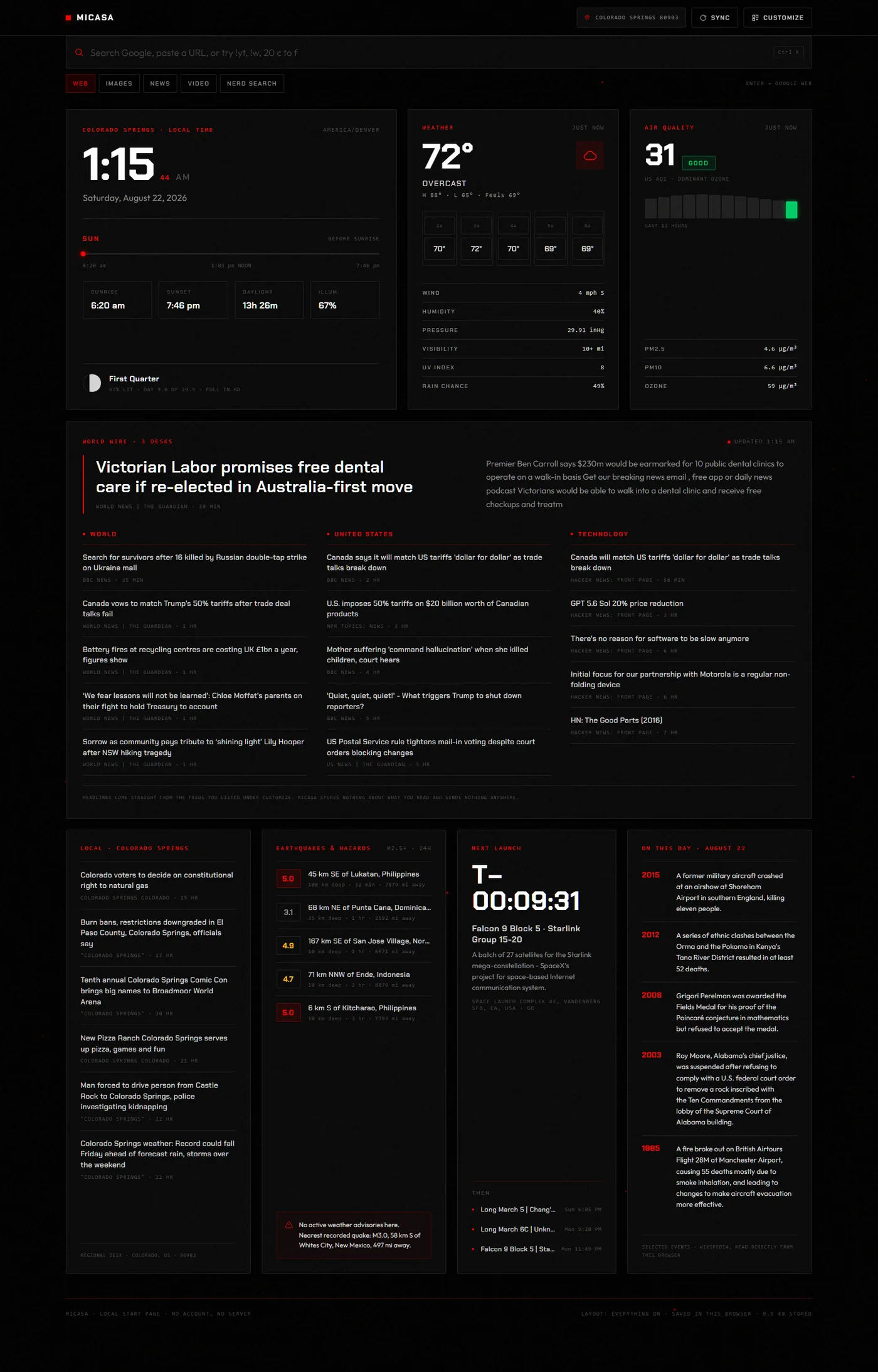
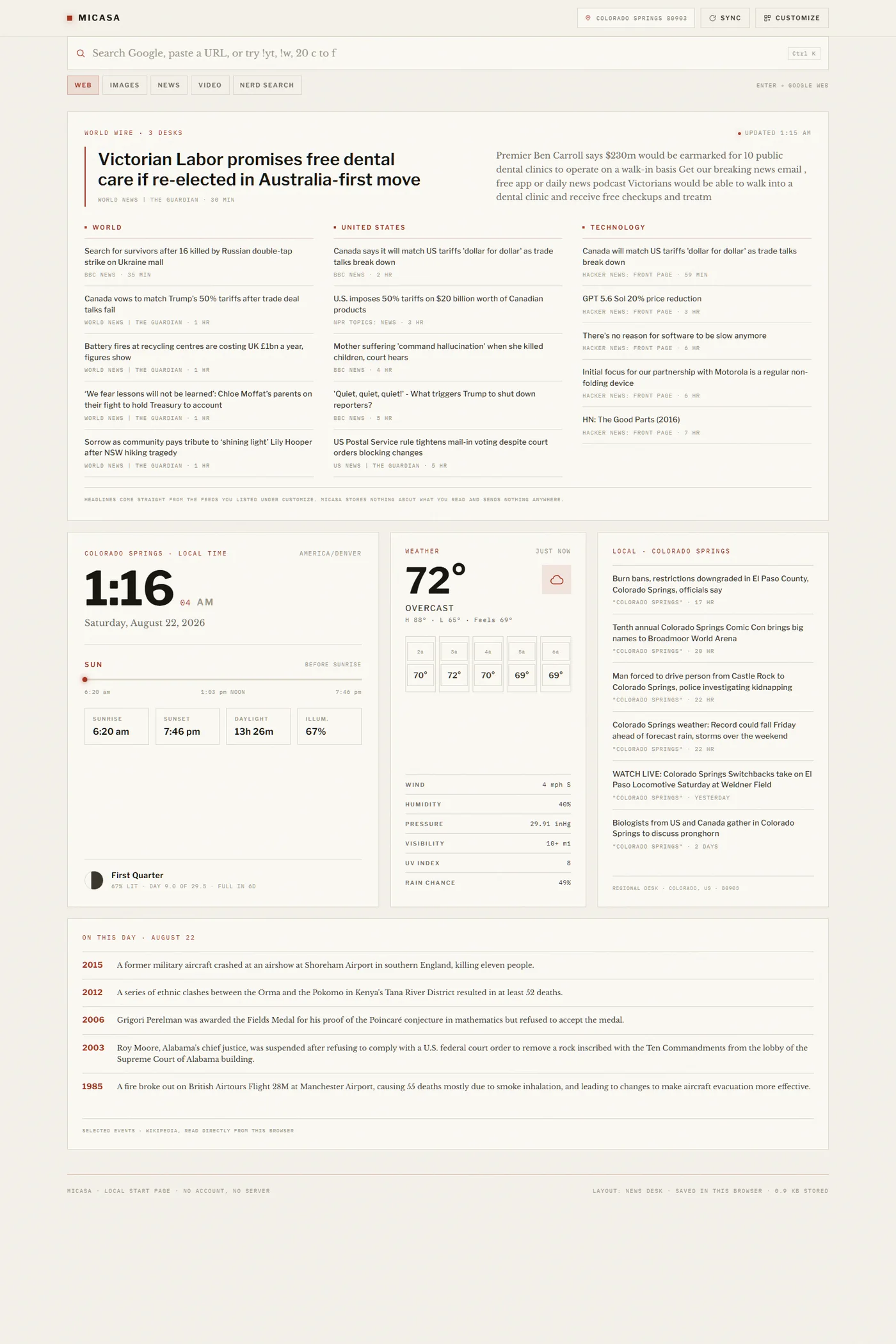
The MiCasa board: a large clock with sunrise, sunset and moon phase, current weather with an hourly strip, air quality with a twelve hour trend, a wire of world headlines in three columns, local news, recent earthquakes, a launch countdown, and events from this day in history

The default board. Everything on it is live and everything on it is optional.

The Board

Eight modules. Keep the ones you want.

Each one loads on its own and fails on its own. A dead API costs you one card with a retry button, not a broken page.

Clock & Sky
Local time wherever you tell it you are, with sunrise, sunset, daylight remaining, a solar progress bar, and the moon's phase and illumination. Calculated on your device from your coordinates, so it keeps working with the network unplugged.
Weather
Current conditions and feels-like, the day's high and low, the next five hours, then wind, humidity, pressure, visibility, UV index and rain chance. From Open-Meteo, no key required.
Air Quality
US AQI with its category and dominant pollutant, a twelve hour trend drawn from real hourly readings, and the raw PM2.5, PM10 and ozone figures underneath.
World Wire
A lead story with its summary, then three columns of headlines. The feeds are entirely yours: add desks, name them what you like, and point them at any RSS or Atom URL.
Local News
Headlines for the actual town your location resolves to. Give it a postal code and it narrows from the metro area to your side of it.
Hazards
Every magnitude 2.5 and up in the last twenty four hours, worldwide, with depth and how far it was from you. Plus any active weather alerts for your exact coordinates.
Space Launches
A live countdown to the next orbital launch with vehicle, payload, pad and window, and the three flights queued behind it.
On This Day
Selected events for today's date, each linking to the full account.
Add your own
The whole thing is one readable file with no build step. If you want a ninth module, the eight in front of you are the worked examples.
Search

Type, hit Enter, go.

No browser lets a web page drive its own address bar, so MiCasa does the honest thing and hands your query straight to a real search engine. Enter goes to Google by default, or to DuckDuckGo, Bing, Brave, Startpage, Ecosia, Kagi, Mojeek or any URL template you supply. Scope chips send it to images, news or video instead.

A leading ! routes around the engine entirely. !yt for YouTube, !w for Wikipedia, !gh for GitHub, !so, !npm, !crates, !maps, and a dozen more. Paste a URL and Enter just goes there. Suggestions complete as you type, and switching them off means nothing is requested.

Type 20 c to f or (1920*1080)/1000 or 26.2 mi to km and the answer appears above the results before you have finished. That runs on your machine with a hand-written parser. No request goes out, and none needs to.

Nerd Search

The one search that stays on the page.

Every keyless web index either refuses to talk to a browser or matches too loosely to be worth showing, so MiCasa does not pretend otherwise. What a browser can query directly is the developer indexes, and those it queries in full.
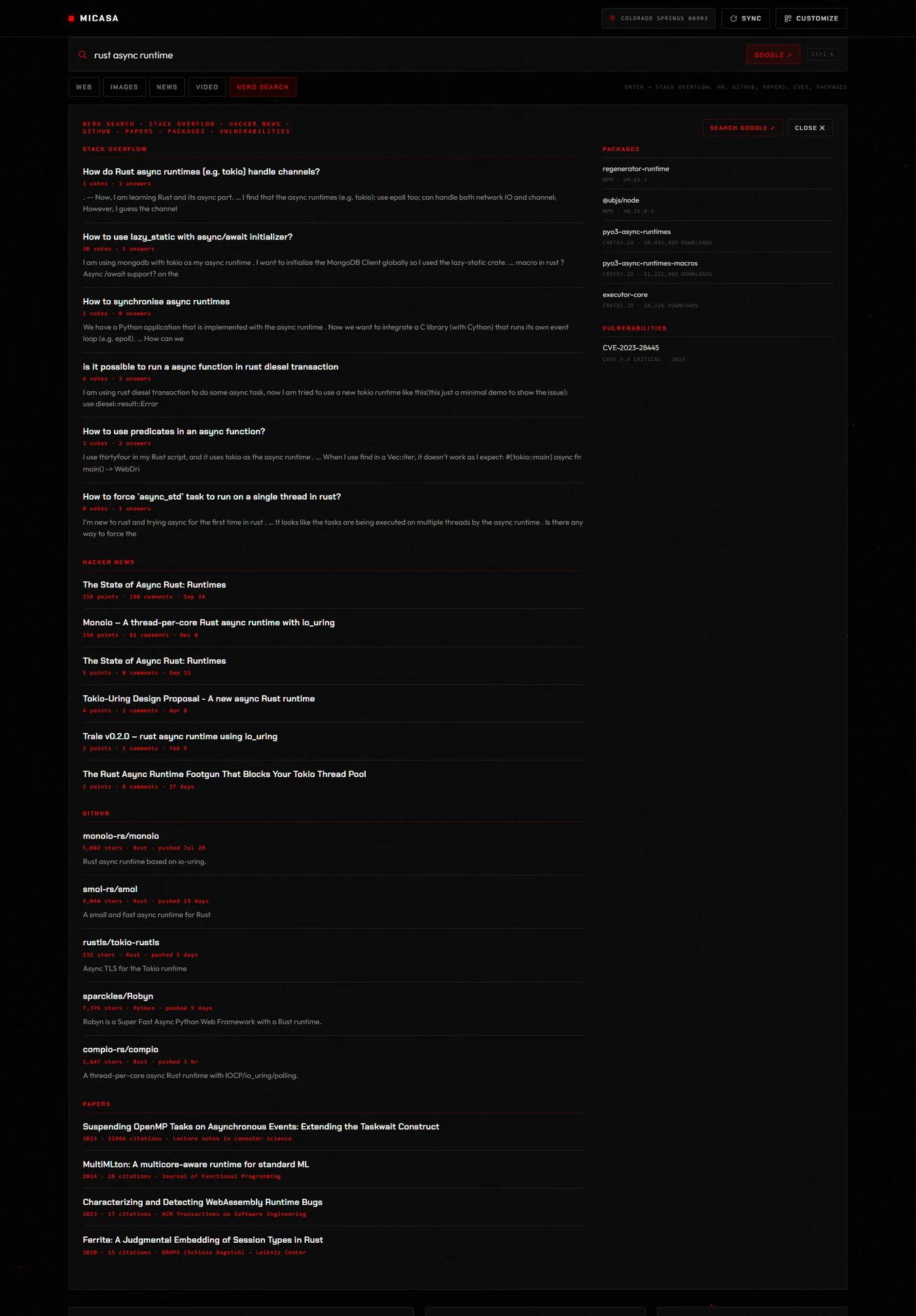
Nerd Search results for rust async runtime, showing grouped results from Stack Overflow, Hacker News and GitHub in the main column with package registry hits and a CVE listed alongside

One query, ten indexes: Stack Overflow, Super User, Hacker News, GitHub, OpenAlex, the NVD, npm, crates.io, PyPI and Packagist. No key, no relay, no server.

Customization

Genuinely everything.

One panel, everything in it, saved the instant you touch it. No profile, no sync, no "upgrade to customize".
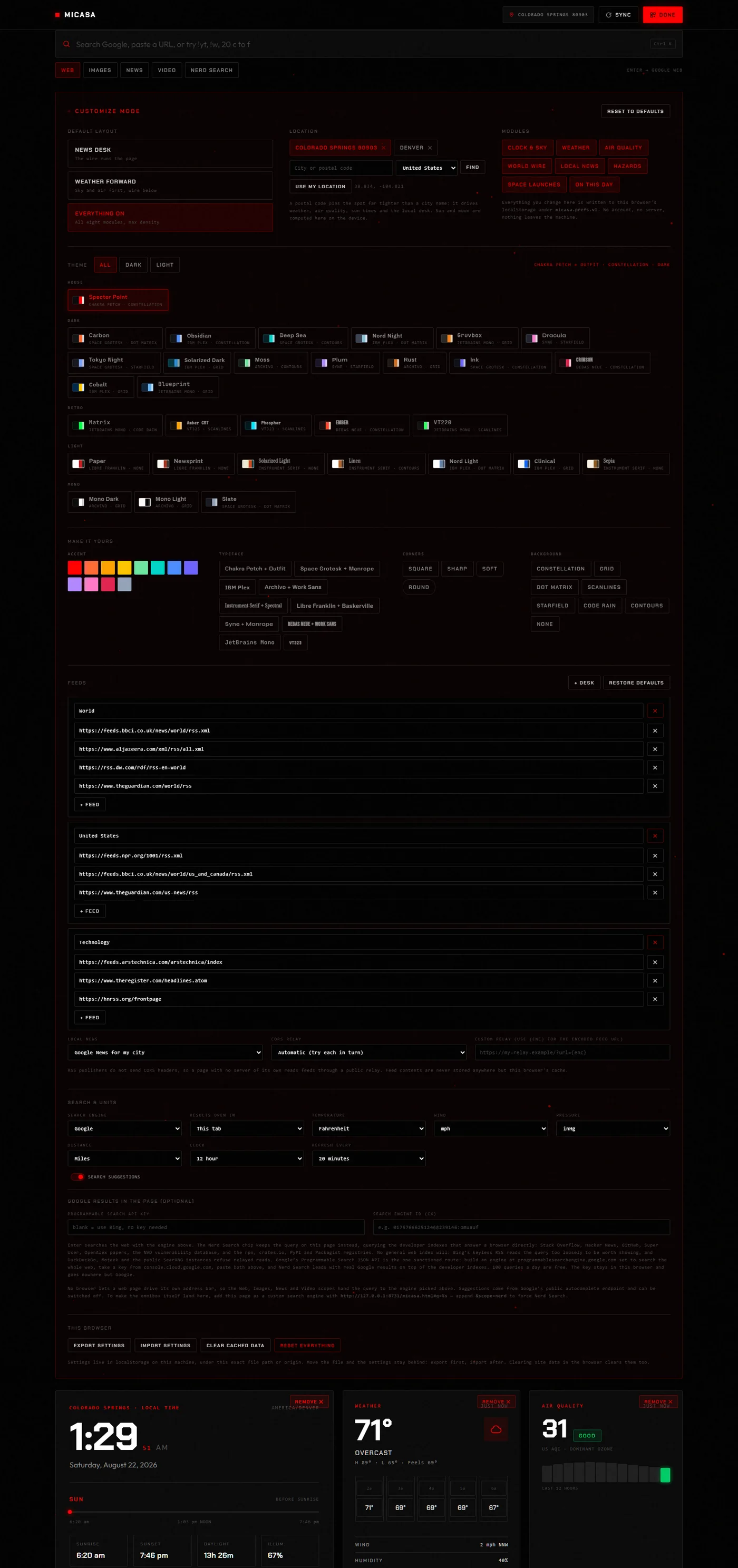
The MiCasa Customize panel showing layout presets, location entry with saved places, module toggles, the full theme gallery grouped by family, accent and typeface and corner and background overrides, the feed desk editor, and search and unit settings

The Customize panel, open on the default board.
Customization

What you can change.

Thirty-one themes
Across five families: House, Dark, Retro, Light and Mono. Solarized in both directions, Gruvbox, Dracula, Tokyo Night, Nord, Deep Sea, Plum, Rust, Cobalt, Blueprint, Matrix, Amber CRT, Phosphor, VT220, Paper, Newsprint, Linen, Sepia, Clinical. Each brings its own palette, type pairing, corner radius and background. Filter the gallery to dark or light only.
Overrides on top
Twelve accent colours, ten typeface pairings, four corner radii, and eight animated canvas backgrounds: constellation, grid, dot matrix, scanlines, starfield, code rain, contours, or nothing at all. Layer them over any theme, then clear them in one click to get the theme back as shipped.
Layout
Three presets that genuinely rearrange the board rather than hiding cards, each carrying its own per-module widths. News Desk runs the wire across the top. Weather Forward leads with sky and air. Everything On packs all eight in at maximum density. Then add and remove modules from the board itself.
Location
City name, or a postal code resolved to the delivery area across about forty countries, or the browser's own position if you would rather ask it. Saved locations become one-click chips. Your choice drives the clock's timezone, weather, air quality, sun times, quake distances and the local news desk.
Feeds
Add, rename and delete desks. Put any number of RSS or Atom URLs under each. Point local news at your own sources instead of the automatic ones. Pick which public CORS relay fetches them, or supply your own URL template.
The details
Fahrenheit or Celsius. mph, km/h, m/s or knots. inHg or hPa. Miles or kilometres. Twelve or twenty four hour clock. Refresh anywhere from five minutes to three hours. Export the lot to a JSON file and import it on another machine.
Customization

The same page, wearing something else.

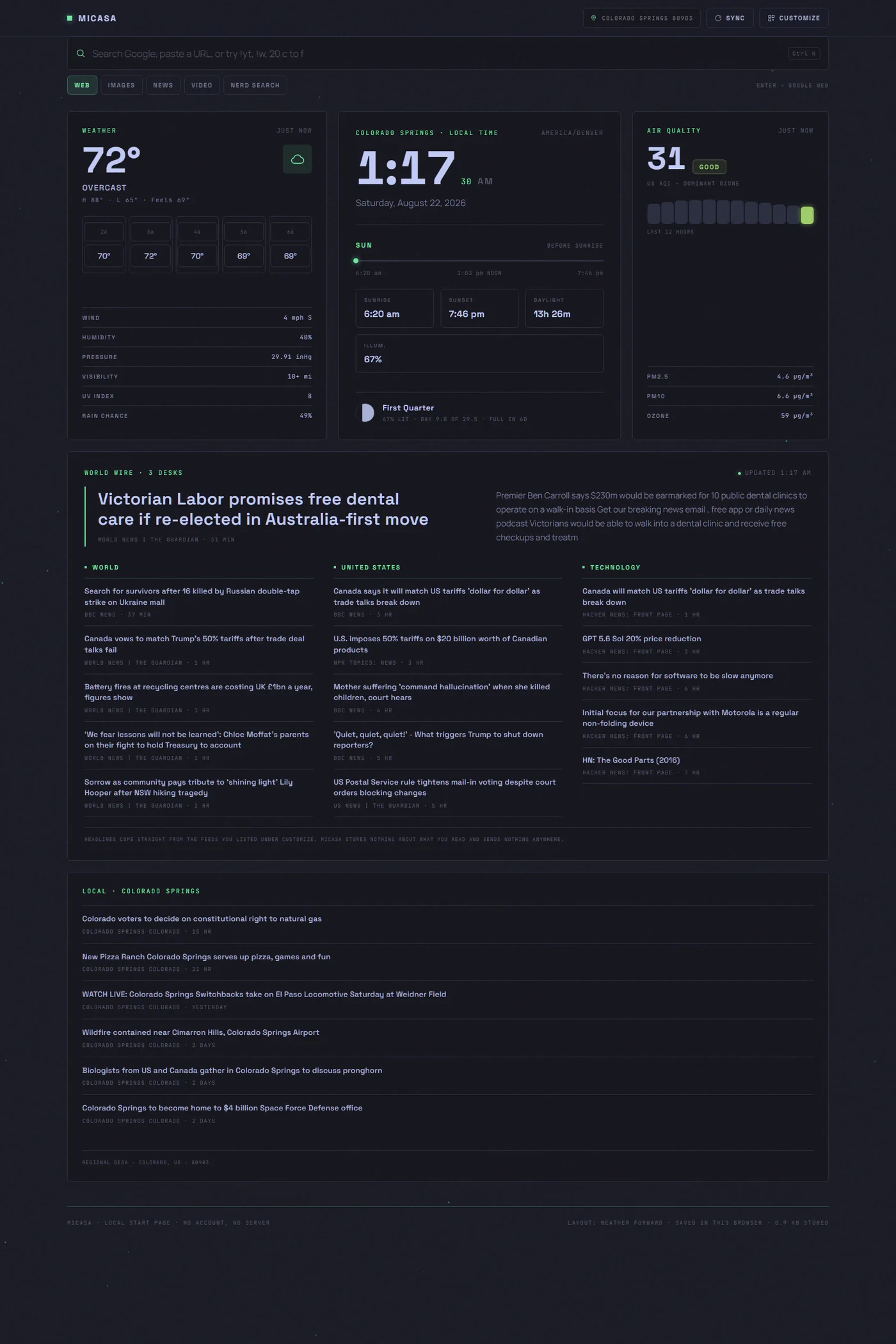
MiCasa in the Newsprint light theme using the News Desk layout, with the world wire running across the top of the page

Newsprint, News Desk layout.

MiCasa in the Tokyo Night theme with a green accent override and the Weather Forward layout, leading with weather and air quality

Tokyo Night, green accent, Weather Forward layout.

The Point

No ads. No tracking. Not ever.

Every other start page is an advertising surface wearing a clock. This one is a file.

What actually leaves your browser

Being straight about it, since "no tracking" is a claim anyone can print. MiCasa makes exactly the requests you would make yourself:

That is the entire list. Settings and cached responses sit in localStorage on your machine under micasa.prefs.v1. The file is 150 KB of readable HTML with one inline script and no dependencies, so none of this has to be taken on trust. Read it.

Setup

Make it your home page.

Paste this address wherever your browser asks for one.

https://www.lockewerks.com/micasa/app

Chrome and Edge

Settings, then On startup, then Open a specific page or set of pages, then Add a new page. Paste the address. To put it on the home button too, turn on Show home button under Appearance and paste it there as well. Chrome does not let a website claim the New Tab page on its own, so that one needs an extension.

Firefox

Settings, then Home. Set Homepage and new windows to Custom URLs and paste the address. Set New tabs to Custom URLs and paste it again, and Firefox will use it for every new tab.

Safari

Settings, then General. Paste the address into Homepage, then set both New windows open with and New tabs open with to Homepage.

Phone or tablet

Open it, then Add to Home Screen from the share menu. It launches full screen with no browser chrome, and the layout collapses to a single column on its own.

As your search engine

MiCasa answers a query handed to it in the URL, so your address bar can land here first. Add https://www.lockewerks.com/micasa/app#q=%s as a custom search engine under Settings, Search engine, Manage search engines in Chrome or Edge, or as a keyword bookmark in Firefox. Append &scope=nerd to send everything straight to Nerd Search.

Your own copy

Download micasa.html and open it from your desktop, or drop it on any static host. It runs from file:// with no web server at all. Settings are keyed to the exact path, so pick a home for it and leave it there. Rename it to index.html if you are serving it from a directory root.
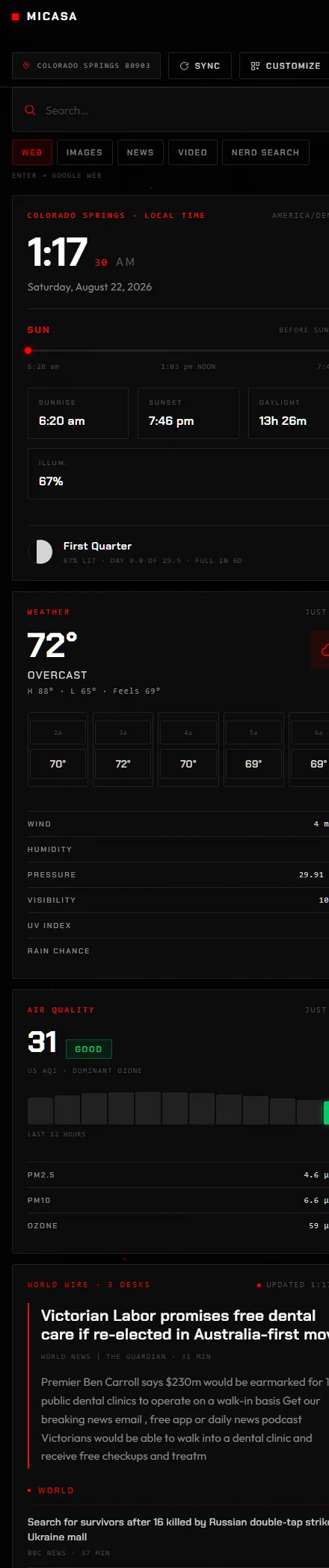
MiCasa on a narrow phone-width screen, with the modules collapsed into a single scrolling column

At phone width the board collapses to one column on its own. Nothing is hidden and nothing needs a separate mobile build.

Under the Hood

Where the data comes from.

Every one of these is free, needs no API key, and is contacted by your browser directly.

Weather and air quality
Open-Meteo
Places and postal codes
Open-Meteo geocoding, Zippopotam, BigDataCloud
Rough location on first run
ipwho.is, geojs
Earthquakes and alerts
USGS, US National Weather Service
Launches
The Space Devs
On this day
Wikimedia
Local news
Bing News RSS
Your wire
Whatever feeds you list, through a relay you choose
Nerd Search
Stack Exchange, Algolia, GitHub, OpenAlex, NVD, npm, crates.io, PyPI, Packagist
Sun and moon
Computed on your device, no network
Requirements
Chrome 103+, Firefox 100+, Safari 16+, or anything newer
Size
One HTML file, 150 KB, no dependencies, no build step
Get It

It is already running.

Nothing to install and nothing to agree to. Open it, and if you like it, paste the address into your browser's home page box.